
Prommer Service Manual 1
Oberheim Prommer
Digital MIDI Sampler / PROM Programmer
SERVICE MANUAL
Paul J. White
© 1986 Oberheim – A Division Of ECC Development Corporation
11650 West Olympic Boulevard, Los Angeles, California 90064
Oberheim, the Oberheim logo and Prommer are trademarks of ECC
Development Corporation.

Prommer Service Manual 2
Table of Contents
Introduction .......................................................................................................... 3
Power Supply Adjustment .................................................................................... 3
Initialization .......................................................................................................... 3
Test Programs...................................................................................................... 4
Display Intensity................................................................................................ 4
Memory Test..................................................................................................... 4
Display test ....................................................................................................... 5
Sine wave test .................................................................................................. 5
VCC Supply test ............................................................................................... 5
VPP Power supply test ..................................................................................... 6
Relay Test ........................................................................................................ 6
PROM data test ................................................................................................ 6
Battery replacement ............................................................................................. 7
Circuit description................................................................................................. 7
Power supply .................................................................................................... 7
Programmable power supplies ......................................................................... 8
Battery backup.................................................................................................. 8
RESET circuitry ................................................................................................ 8
Microprocessor and memory ............................................................................ 8
Clock and timing circuitry.................................................................................. 9
MIDI interface ................................................................................................... 9
Audio input...................................................................................................... 10
Analog to digital converter .............................................................................. 10
Digital to Analog conversion (Playback) ......................................................... 11
Reference voltage generation......................................................................... 11
Vacuum Fluorescent Display .......................................................................... 12
EPROM Programming circuitry....................................................................... 12
Switch Matrix .................................................................................................. 13
LED audio level meter .................................................................................... 13
External Trigger Input ..................................................................................... 13
Prommer 6809 Programming Reference............................................................ 14
Interrupts ........................................................................................................ 14
Memory........................................................................................................... 15
Memory Map of the Prommer...................................................................... 15
Programming considerations .......................................................................... 19
Prommer Service Manual 3
Introduction
This manual is divided into two sections. The first section is designed to assist
the service technician in testing and troubleshooting the Oberheim Prommer
MIDI Audio sampler / PROM programmer. The second section is a programming
reference for the Prommer for those who wish to write application programs for
the Prommer.
The reader should have a basic knowledge of electronics and microprocessor
systems, and be familiar with standard repair techniques.
Power Supply Adjustment
The first step in testing is the calibration of the +5 volt power supply. This is the
only adjustment necessary for correct operation. Open the unit by removing the
two screws under the front edge and lifting the front panel open. With AC power
ON, connect the common lead of a DC voltmeter to ground and probe the +5 volt
test point (the lower end of resistors R81 and R82). Now, adjust the trimmer VR1
(near the upper right corner of the processor board) until the measured voltage is
5.00 volts +/- 10 millivolts.
You may verify the correct operation of the other power supply voltages on the
processor board now. There are no adjustments for the other supplies, but they
should be within the specified ranges.
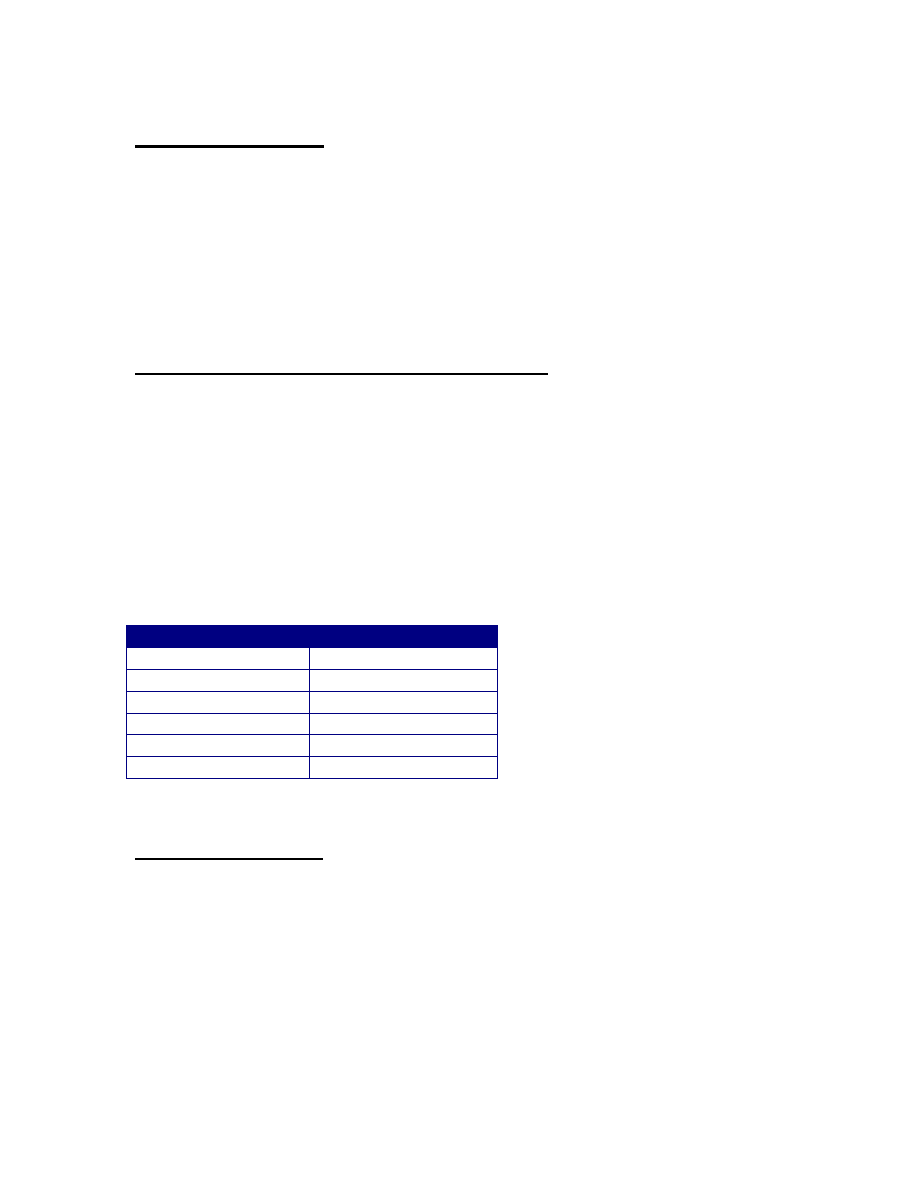
Voltage
Test point location
+12v +/- 600mv
Pin 4, U18 (TL084)
-12v +/- 600mv
Pin 11, U18 (TL084)
-5.1v +/- 500mv
Pin 7, U14 (4051)
-35v +/- 5 volts
D7 anode
+35 volts +/- 5 volts Q1 collector
-4.1v +/- 100mv
Pin 1, U9 (TL082)
Initialization
The first time the unit is powered up, the RAM will contain random data. The
display will read CHECK BATTERY if the unit has never been initialized or if a
memory loss has occurred. To clear the CHECK BATTERY message, initialize
all system and block variables and erase all sound storage RAM, turn the unit off,
press and hold the CLEAR key, and turn the power back on. Continue holding
the CLEAR button until the display lights.

Prommer Service Manual 4
Test Programs
There are eight test programs built into the Prommer. To access the test
programs, hold down the PLAY and RECORD switches while turning on the AC
power. The display should read “TEST PROGRAMS” until the switches are
released, and then will display the first test. To skip over any test in the
sequence, just press the STOP switch.
Display Intensity
Display reads: DISPLAY INTENS. . . The arrow buttons are used to increase or
decrease the brightness of the display. After the display intensity is at an
acceptable level, press the STOP switch to access the next test. The brightness
will remain set at this level until an ERASE ALL, or power-on erase command
resets all memory.
Memory Test
Display reads: MEMORY TEST *. Press EXECUTE to start this non-destructive
RAM test. The display should read BUSY for about 15 seconds and then if there
are no errors in the 64K of data storage memory, the display will read OK. If a
memory error occurs, the address of the first bad location will be displayed. To
locate a bad RAM chip use the following table.
IC number
Address range
U46
0 – 8192
U47
8192 – 16383
U48
16384 – 24575
U49
24576 – 32767
U53
32768 – 40959
U54
40960 – 49151
U55
49152 – 57343
U56
57344 – 65535
Press STOP after the memory test is complete to go to next test.

Prommer Service Manual 5
Display test
Display reads: DISPLAY TEST *. Press EXECUTE to start the display test. The
letters A through Z will be displayed in all sixteen character positions in repeating
sequence until the STOP key is pressed. Press STOP to end the display test.
Sine wave test
Display reads: 440HZ SINE WAVE *. Press EXECUTE to start the sine wave
test. A 440HZ sine wave will be generated using the Prommer digital to analog
circuitry. An amplifier and speaker connected to the Line Output can be used to
monitor the output for distortion or an oscilloscope may be used to check the
waveshape. The amplitude of the wave at the output should be about 7 volts
peak-to-peak. If the frequency of the wave is not 440.0Hz, there may be a
problem with the sample rate generator, or the master clock oscillator. Press
STOP to access the next test.
VCC Supply test
Display reads: VCC SUPPLY TEST *. This test and the next one are used to
verify the operation of the programmable power supplies used for EPROM
programming. Make sure the EPROM socket is empty before continuing. Press
EXECUTE to start the test. Connect a DC voltmeter to pin 14 (ground) and
probe pin 28 of the EPROM socket on the front panel. (Note: pin 14 is located at
the lower left corner of the socket, pin 28 is at the diagonally opposite corner and
pin 1 is at the top left corner.) Now, the measured voltage should be within about
five percent of the voltage displayed on the Prommer front panel (see the table).
Use the arrow switches to make the voltage (displayed in millivolts) go up or
down. You may press the “9” switch to set the voltage to its maximum value, or
press the CLEAR switch to reset the voltage to zero.
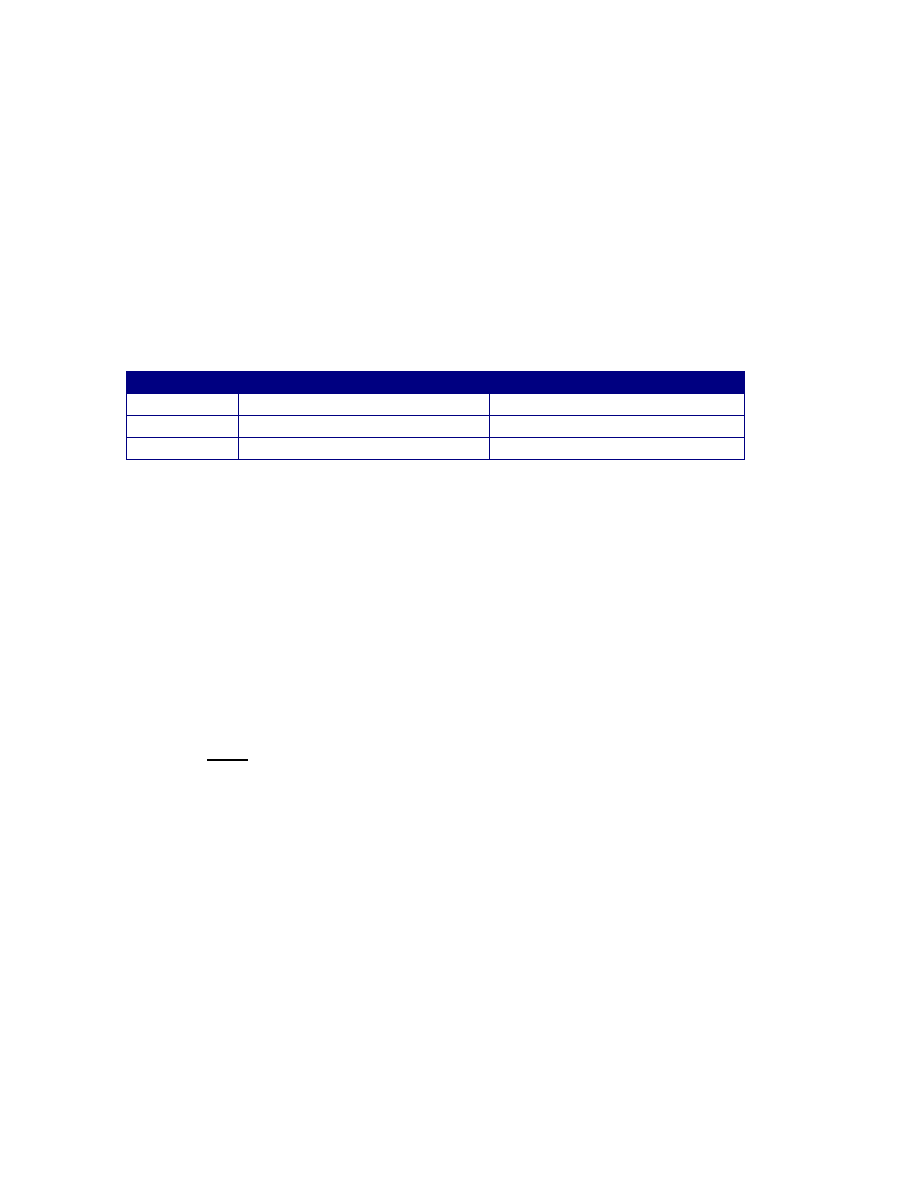
The VCC supply should be test at several points including zero volts, five volts
(4992 millivolts) and six volts (6016 millivolts). Press STOP to go to the next test.
VCC test voltages (pin 28)
Displayed Minimum Voltage Reading Maximum Voltage Reading
0
-0.05
+0.05
4992
4.75
5.25
6016
5.70
6.30
Prommer Service Manual 6
VPP Power supply test
Display reads: VPP SUPPLY TEST *. Press EXECUTE to test the high voltage
programmable power suplly. Connect a DC voltmeter to pin 14 (ground) and
probe pin 1 of the EPROM socket on the front panel. Use the arrow switches to
change the voltage. Voltages should be within about five percent of the
displayed value. Test the VPP supply voltage at zero volts, twelve volts
(11978mv), and twenty-five volts (25016mv). Press STOP to go on to the next
test.
VPP test voltages (pin1)
Displayed Minimum Voltage Reading Maximum Voltage Reading
0
-0.05
+0.05
11978
11.5
12.5
25016
24.0
26.0
If an oscilloscope is available, check the rise and fall time of both power supplies
as you toggle between zero and the maximum voltage. The rise and fall times
should be less than 100 microseconds and there should be no more than 0.5
volts of overshoot. Also check the waveforms for ripple or oscillation. There
should be no more than 100mv of ripple on either power supply at any setting.
Relay Test
Display reads: RELAY TEST *. Press EXECUTE to turn all relays in the
EPROM programming circuitry on and off repeatedly. You should be able to
hear the three relays clicking on and off in a steady rhythm. Press STOP to end
the relay test. You may need to hold the STOP switch for a second before the
Prommer will respond. If the display still reads RELAY TEST, press STOP again
to go to the next test.
PROM data test
Display reads: PROM DATA TEST *. Press EXECUTE to start the test. Display
will then read BUSY…. The PROM data test toggles all address and data lines
connected to the EPROM socket on the front panel. An oscilloscope or signature
analyzer is required to complete this test. Pressing STOP will now return control
to then normal Prommer power-on sequence.

Prommer Service Manual 7
Battery replacement
The static RAM is powered by a lithium battery when the AC power is off. The
battery will require replacement occasionally (normal battery lifetime should be at
least one year – typically much longer). The battery is a three volt BR-2032-1HB
or equivalent. To replace, disconnect the Prommer from its source of AC power
and open the unit by removing the two screws securing the front panel. The
battery is located on the right side of the lower printed circuit board near the front
and may be unsoldered and replaced without removing the circuit board. Be
careful not to short circuit the battery during removal or replacement and carefully
observe correct polarity. The positive terminal of the battery should connect to
the pad on the right.
After installing a new battery, check the standby current drain by connecting a
voltmeter across the 1k resistor in series with the battery (R141). Measure the
voltage drop and divide the voltage reading by 1000 to obtain the actual current
drain. Normal current with power off should be less than 20 microamps (voltage
reading of .020 or less). It is not unusual for some units to have a battery current
drain that is too low to measure.
Circuit description
Please refer to the schematic diagram pages indicated. Signal names are shown
in capital letters. Names followed by an asterisk (*) are active low logic signals.
Others are active high logic signals or analog signals.
Power supply
(Processor schematic page 3)
The +5 regulator and the VCC programmable regulator draw power from one of
two transformer secondaries through rectifier D9 – D12 and filter capacitor C69.
The +5 regulator consists of active components U34 (LM723) and Q8 (D880 or
2N3055) and is adjustable with the 1k trim pot. The other transformer secondary
supplies power to the +12v and –12v regulators through D15 – D18, filtered by
capacitors C49 and C50. A voltage doubler consisting of C57, C74, D13 and
D14 supplies +35 volts for the VPP programmable regulator. Another voltage
doubler (C67, C68, D7 and D8) supplies the negative voltage for the vacuum
fluorescent display. A zener diode (D1) and resistor (R43) tap the –12v supply to
provide the –5v source for the analog switches U3, U4, and U14.

Prommer Service Manual 8
Programmable power supplies
(Processor schematic page 3)
Various voltages required by different types of EPROMs are generated by two
programmable power supplies. Half of U36, Q1, Q3, Q4, and Q6 are the active
components in the VPP supply. VPP has a range of zero to +27 volts, the output
controlled by the reference voltage VPPREF which is produced by a digitally
programmed DAC/sample/hold circuit. The supply circuit is current limited and
has a voltage gain which is determined by R93 and R94. Digital signal VPPSEL*
must be at logic zero to enable the VPP supply.
The other half of U36, Q2 and Q5 make up the VCC programmable supply which
has an output range of zero to +8 volts. The gain of the VCC circuit is
determined by R97 and R99. VCC is also current limited and the circuit is
enabled by a logic zero on VCCSEL*.
Battery backup
(Processor schematic page 3)
In order to retain the contents of memory at all times, a three volt lithium battery
supplies power to the CMOS RAM through R141 and D26 when the main power
is off. When the power is on, the +5v supply powers the RAM through D25.
RESET circuitry
(Processor schematic page 5)
The PUP (Power UP) circuitry consisting of active components Q10 and U65
disables writing to RAM when power is off. PUP is connected to all 6264 ICs
directly and to the 6116 RAM through U41. PUP is also buffered by U41 to
provide a RESET* signal for the microprocessor and certain latches.
The PUP circuit is very sensitive to sudden changes in the +5 volt power supply.
If the ripple on the +5 line is too great, PUP will trigger and RESET* will go low,
resetting the microprocessor.
Microprocessor and memory
(Processor schematic page 1)
The 68B09 microprocessor chip (U38) along with the firmware contained in
EPROMs U51 and U52 control all operations of the Prommer. The main

Prommer Service Manual 9
operating system is located in U52 and any expansion programs are located in
U51.
The processor address lines are decoded by U37, U42, U43, and U50 to produce
chip select signals. U44 buffers the data lines for all input/output devices.
Note that the eight 6264 RAM chips (U46 - U49, U53 - U56) are arranged in two
banks of 32k bytes each occupying the lower 32k address space (0000H through
7FFFH). Latch U40 selects the current bank according to D7 and the BANK*
signal. Individual memory chips are selected by decoder U39. RAM U45 which
is used for stack operations and variable storage occupies addresses 8000H
through 87FFH is also protected by PUP and battery backup. EPROMs U51 and
U52 occupy addresses A000H through BFFFH and C000H through FFFFH.
Clock and timing circuitry
(Processor schematic pages 1,2)
The master clock from which all others are derived is a 16MHz oscillator
consisting of a crystal and transistor Q9. The oscillator signal is buffered by U69
and used by divider U62 to generate 8MHz, 2MHz and 1MHz which is again
divided by U63 to provide 500kHz for ACIA U31. The sample rate clock is
generated by a sixteen bit counter made from U59, U60, U67 and U68. This
counter counts up at 16MHz until the maximum count is reached at which time it
is loaded with data from latches U58 and U60 and a START* pulse is generated
and stretched by U61 and U62. The counter begins counting from the new value
and the cycle is repeated. Different sample rates are generated by loading the
latches with different numerical values. U62 also provides SARCLK –
synchronized with START* - which drives the A/D successive approximation
circuit.
MIDI interface
(Processor schematic page 2)
U31, a 68B50 Asynchronous Communication Interface Adapter (ACIA) is used to
transmit and receive serial data at 31250 Baud. Incoming MIDI data is buffered
by optoisolator U32/U33 and received by U31 at pin 2. Outgoing data (U31 pin
6) is buffered by U35 and sent out over the MIDI Out connector. IRQ* is
generated by U31 (pin7) when a byte of data has been received or when the
ACIA transmit buffer is empty.

Prommer Service Manual 10
Audio input
(Processor schematic page 5)
The balanced microphone input is amplified by U1 (output-pin 1) and summed
with the line input at U1 (output-pin 14). The gain of the summing section is
switchable to allow line inputs of +4 dbm or –10 dbm. The audio signal then
goes to the input fader where the audio level may be attenuated. U1 (output-pin
8) buffers the input level control and with U4 is used to switch pre-emphasis in or
out. The audio signal now goes to two nine-pole lowpass filters (U2 and U6).
The cutoff frequencies of the two filters are approximately 16kHz and 8kHz. The
16kHz filter is used for sample rates of 32kHz and 24kHz, and the 8kHz filter is
used for 16kHz and 12kHz sample rates. The filter output is switched by U3 and
highpass filtered by C43 and R51, and buffered by U18 (output-pin 1). This
signal goes from here to the A/D circuitry.
A full wave peak detector for metering the audio signal is formed by U29, D4, D5,
and C51 and this meter signal is sent to the LED meter circuit on the
switchboard.
Analog to digital converter
(Processor schematic page 4)
The companding DAC (U20) is the heart of the sampling circuitry and is shared
by the A/D and D/A converters.
The reference voltage for the DAC (ADCREF) is digitally programmable to allow
modulating the loudness of playback. During recording ADCREF is fixed at 3.9
volts.
Analog to digital conversion takes place when the ADC/DAC signal is high. Tri-
state buffer U27 is enabled, linking SAR U26 to DAC U20. When a START*
pulse is received from the sample rate clock, several things happen. The SH
signal from U25 is set high, turning off sample/hold switch U3. This causes the
analog input (at U18 pin 8) to “hold” during conversion. START* also sets a flip-
flop (U63 pin 5) Q output low until it is set high again by SARCLK; this
momentary low pulse resets the SAR (successive approximation register) and
starts the conversion process. The CC signal from the SAR goes high and
remains high until the conversion is complete. CC is latched by flip-flop U25 pin
9 to generate ENCODE. This signal goes to pin 1 of the DAC (U20) and is used
to select the E- and E+ current outputs of the DAC which are compared with the
input sample by comparator U19 and the resulting CDATA signal is used by the
SAR to make the next approximation in the conversion cycle. Exclusive OR

Prommer Service Manual 11
gates U22 are used to detect the polarity of the sample during the first
conversion cycle.
Also, at the rising edge of the START* pulse, the data from the previous
conversion is latched into U28 and a FIRQ* interrupt signal to the processor is
generated by flip-flop U40 (page 2). The data may then be read from latch U28
and stored in memory. The interrupt flip-flop is cleared when one of the following
three I/O signals become active: WDAC*, RADC*, or KEY*.
Digital to Analog conversion (Playback)
During playback of sounds, ADC/DAC is set low, disabling the outputs of U27
and enabling the outputs of FIFO register U21 and U24. The processor stores
sample data in the FIFO (First-In, First-Out) register and the data is clocked out
at a steady rate by the shift-out signal SO*. SO* is generated by flip-flop U23
using the sample rate clock START* only when the DOR (Data Out Ready) lines
from both U21 and U24 are high, indicating that data is ready to be shifted out.
The ENCODE signal is low now, reset by the ADC/DAC signal on pin 13 of U25.
This enables the D- and D+ outputs of the DAC; the data from the FIFO sets the
DAC output level. The amplitude of the DAC output depends on the reference
voltage ADCREF, which is used to control the overall loudness of the output.
The sample/hold circuit (U3 and U18 (output-pin 7)) is gated by SH and the audio
signal continues to the input of voltage controlled filter U7. The cutoff frequency
of the filter is controlled by analog signal VCFF and the output goes to bypass
switch U4 and then to de-emphasis and amplifier circuit U4 and U1 (output-pin
7).
Reference voltage generation
(Processor schematic page 4)
Four digitally controlled analog reference voltages are generated by the
freerunning sample/hold circuitry. Two dual port registers U15 and U16 store
data from the processor in one of four locations determined by address lines A0
and A1. This data is read out of the registers independently of the input and
controls the output of linear DAC U10 and U9. The DAC output is routed to the
appropriate sample/hold buffer (U13) by analog switch U14.
The reference voltage for this circuit is derived from the regulated +5 volt power
supply by resistors R46 – R48 and U9 (output-pin1). This reference voltage is
fairly critical, especially for the programmable power supply controls VCCREF
and VPPREF. The voltage at pin 1 of U9 should be –4.10 volts DC. If there are
any problems with the programmable power supplies, check this reference

Prommer Service Manual 12
voltage. Note: be sure that the +5 volt power supply is set to +5.000 volts for
correct operation of this circuit.
Vacuum Fluorescent Display
(Switchboard schematic page 2)
The filament of the vacuum fluorescent display is heated by AC voltage
generated by oscillator U8 and biased to –30 volts. Zener diodes are used to
provide –10 volts and –30 volts for the display.
Whenever a new message is displayed, DISPRST* is pulsed low through level
shifter Q5 to reset the display controller U9. Data for the controller is transferred
in serial form (DISPDATA and DISPCLK). These two signals are generated on
the processor board by a parallel to serial converter made up of U11, U64, U70
and U57 (Processor schematic page 2). When DISP* is activated, counter U64
is reset and data is loaded into shift register U70 and U57. When DISP* goes
high again, counter U64 starts counting and flip-flop U70 (pin 9) begins toggling,
generating DISPCLK and shifting data out of U57 (DISPDATA). After eight bits
of data have been shifted out, DISPCLK stops until the next byte is loaded.
EPROM Programming circuitry
(Switchboard schematic page 2)
Various types of EPROMs may be programmed on the Prommer, some types
requiring different voltage levels at different pins. The EPROM to be programmed
is installed in the 28 pin socket on the front panel. Addresses and data are
presented to the EPROM through latches U11, U12 and U6. Data is read out of
the EPROM through buffer U7. Three relays, K1, K2 and K3 are used to switch
high voltage signals to the EPROM and are controlled by latch bits K1, K2 and
K3 (U10).
A high level on the latch output K1 will energize relay K1, disconnecting OE* from
pin 22 and connecting VPP. K1 is used in programming 2732 type EPROMs.
When K2 is activated, PROM address line 13 is disconnected from pin 26 and
VCC is connected to provide power for all 24 pin PROMs.
To use 27512 type EPROMs, address line 15 must be connected to pin 1 by
activating K3, disconnecting VPP.

Prommer Service Manual 13
Switch Matrix
(Switchboard schematic page 1)
Switches are scanned under processor control by selecting a column of the
switch matrix with address lines A0 – A2 and KEY* (U3) and reading switch data
through buffer U5. Columns 5 and 7 of the matrix are reserved for reading
signals TRIG and DIR from the processor board.
LED audio level meter
(Switchboard schematic page 1)
The meter signal from the processor board is directed to the inverting inputs of
eight comparators (U1, U2). The non-inverting inputs are each connected to a
different reference voltage derived from voltage divider R1 – R8. As the METER
level exceeds each reference level, the output of the associated comparator goes
low, turning on its LED. For proper operation, with no signal input, the METER
signal must be at zero volts, or at least less than the smallest reference voltage
at pin 9 of U1. The red LED at the +5 volt reference comparator should turn on
just before the output of the A/D/A converter begins to clip.
External Trigger Input
(Processor schematic page 5)
The external trigger for the Prommer may be almost any kind of signal or switch.
A normally open or normally closed footswitch, a digital pulse or percussive line
level audio signal may be used.
Pullup resistor R76 allows the use of a switch. The input is AC coupled by C54
and then biased to 2.5v by R74 and R75. This signal then goes to the inverting
input of comparator U30. The non-inverting input of U30 is biased either slightly
above or slightly below 2.5v depending on the trigger polarity signal POL. POL
also selects the polarity of the trigger through Exclusive-OR gate U22. On the
rising edge of the output of U22, the TRIG output of U5 is clocked high until reset
by RSTTRIG*.

Prommer Service Manual 14
Prommer 6809 Programming Reference
For computer programmers wishing to write programs that will run on the
Prommer, this section will describe some of the hardware that is accessible from
software. It is up to the programmer to develop the program on some other
system and prepare it in a form readable by the Prommer (External EPROM,
Internal EPROM, or MIDI dump).
The Prommer is a complex computer product that uses an 8MHz Motorola 68B09
microprocessor. Several books are available at local bookstores on 6809
assembly language, so this section will not go into any detail on the particular
instructions or internal architecture of the 6809. The hardware unique to the
Prommer will be discussed briefly. It may be helpful to refer to the Prommer
schematic diagrams when reading the following descriptions.
Interrupts
There are three interrupt inputs on the 6809; NMI (Non Maskable Interrupt), IRQ
(Interrupt Request) and FIRQ (Fast Interrupt Request). NMI is not used on the
Prommer and is connected to +5v. IRQ is connected to the interrupt pin on the
68B50 ACIA used for MIDI serial communication. FIRQ is connected to a
programmable sample rate generator and may be used for timing sample
playback and recording.
When an interrupt line to the microprocessor goes low, it will stay low until it is
reset under software control. IRQ is reset by reading the appropriate ACIA
register (RDR or TDR). FIRQ is reset by reading or writing to any of the following
address locations: WDAC, RADC, DIR, TRIG or any switch column.
Both IRQ and FIRQ are indirectly vectored so the location of the interrupt
routines may be changed at any time by placing the address of a routine in RAM
at the appropriate vector location. Here is the sequence of events that happen
when an interrupt occurs. The processor will interrupt whatever it is doing after
the end of the current instruction, push all registers and the return address on the
stack (in the case of FIRQ, only the return address and condition code register),
and via the permanent vector address in the Prommer operating system
EPROM, begin executing the main interrupt routine. The main interrupt routine
consists of an indirect jump instruction that loads the program counter from the
following locations.

Prommer Service Manual 15
Table of Interrupt Vectors
8000H IRQ
The address of the interrupt service routine (IRQ) is located in
RAM at this address.
8002H FIRQ The address of the fast interrupt service routine (FIRQ) is
located in RAM at this address.
Memory
The main RAM of the Prommer is arranged in two banks of 32k occupying the
same addresses from 0000H to 7FFFH. The current bank is selected by writing
a 00h or an 80H to the BANK latch (data bits 6 – 0 are ignored). If your program
is located in this part of memory and involves any bank switching remember that
an identical copy of your program must reside in both banks at the same
addresses.
Another 2k of RAM is located from 8000H to 87FFH. The upper 192 bytes
(8740H – 87FFH) are unused by the Prommer and are available for the user.
After calling a subroutine with the “RUN PROGRAM” function, control may be
returned to the Prommer by cleaning up the U and S stacks (if they were used)
and executing a RTS instruction.
An alternate method that will ensure that the stack pointers and all vectors are
correct is to execute a JMP [0FFFEH] instruction. This will use the hardware
RESET vector at FFFEH for an indirect jump to the cold start address.
Memory Map of the Prommer
Address Data Description
0xxx xxxx xxxx xxxx
Sound Storage RAM. Two banks of 32k
Select bank by writing to BANK reg.
1000 0xxx xxxx xxxx
RAM used by operating system:
8000H (2 bytes) IRQ Vector (8000=MSB, 8001=LSB)
8002H (2 bytes) FIRQ Vector (8002=MSB, 8003=LSB)
8004H – 873FH Reserved – Don’t use.
8740H – 87FFH User RAM

Prommer Service Manual 16
Display Board Latch
Write Only: Cleared on Power-up
1000 1xxx xxxx x010
D0 K3 relay
K3 normally connects programmable power supply Vpp to pin 1 of the EPROM
socket. Energizing K3 (write a 1 to the latch) disconnects Vpp and connects
PA15 (EPROM Address MSB).
1000 1xxx xxxx x011
D0 Display reset
Write a 1 to this latch to reset the Rockwell 10937 display controller. Write a 0
after 100us to re-enable the controller.
1000 1xxx xxxx x100
D0 K1 relay
K1 normally connects OE* to pin 22 of the EPROM socket. Energizing K1
disconnects OE* and connects programmable power supply Vpp.
1000 1xxx xxxx x101
D0 K2 relay
K2 normally connects PA13 (EPROM address bit 13) to pin 26 of the EPROM
socket. Energizing K2 will disconnect PA13 and connect programmable power
supply Vcc.
1000 1xxx xxxx x110
D0 EPROM OE*
A low level on the EPROM Output Enable will disable the outputs of the EPROM
data latch and enable the outputs of the EPROM under test.
1000 1xxx xxxx x111
D0 EPROM CE*
Connected directly to pin 20 of the EPROM under test.
Other Latches
(Write Only)
1001 0xxx xx00 0x00
Sample Rate Counter Data LSB
1001 0xxx xx00 0x01
Sample Rate Counter Data MSB
These latches are used to set the sample rate or FIRQ interrupt rate. A 16 bit
binary counter counts up at 16MHz from the value on these latches to FFFFH
and then generates a FIRQ and re-loads the value and starts counting again.
The interrupt frequency in Hertz can be calculated by the following formula:

Prommer Service Manual 17
f = 16,000,000 / (65536 – N)
Where N is the decimal equivalent of the value loaded into the Sample Rate
Counter Data latches.
1001 0xxx xx00 0x10
EPROM Address LSB
1001 0xxx xx00 0x11
EPROM Address MSB
The EPROM address is applied to the EPROM under test.
1001 0xxx xx00 1xxx
Rockwell 10937 display controller
access register (write-only)
Control characters are: A0H through AFH – data buffer pointer control, C0H
through CFH – Number of digits to be displayed (C0H for 16 digits), E0H through
FFH – Duty cycle control (brightness). Upper case ASCII characters (000H
through 7FH) written to this register will be displayed.
1001 0xxx xx01 0xxx
Audio output FIFO register
Data written to this register will be shifted out to the output DAC at the sample
rate if ADC/DAC is low.
1001 0xxx xx01 1xxx
EPROM Data latch
Latch for EPROM data. Output is in tri-state mode when OE* is low.
1001 0xxx xx10 0xxx
D7 Input filter select
Write 0 to select 16KHz filter, 80H to select 8kHz filter.
Analog Control Sample/Holds
(Write Only)
1001 0xxx xx10 1x00
Output VCF frequency S/H
1001 0xxx xx10 1x01
(N) VPP reference voltage S/H:
Vpp = N * 0.106
1001 0xxx xx10 1x10
(N) VCC reference voltage S/H:
Vcc = N * 0.032
1001 0xxx xx10 1x11
ADC/DAC reference (VCA) S/H
Prommer Service Manual 18
RAM Bank Select
(Write Only)
1001 0xxx xx11 0xxx
D7 BANK Select Latch
Write 0 to select bank 0, write 80H to select bank 1.
More Latches
(Write Only)
1001 0xxx xx11 1000
D0 1 = Emphasis On
1001 0xxx xx11 1001
D0 1 = Idle Bypass On
1001 0xxx xx11 1010
D0 1 = Reset FIFO register
1001 0xxx xx11 1011
D0 0 = Reset External trigger F/F
1001 0xxx xx11 1100
D0 ADC/DAC select:
1 = select ADC (input mode)
0 = select DAC (output mode)
1001 0xxx xx11 1101
D0 Ext. Trigger polarity: 1=positive
1001 0xxx xx11 1110
D0 1 = VCC disable
1001 0xxx xx11 1111
D0 1 = VPP disable
Read-Only Buffers
1001 1XXX XXX0 0000
Switch column 0
1001 1xxx xxx0 0001
Switch column 1
1001 1xxx xxx0 0010
Switch column 2
1001 1xxx xxx0 0011
Switch column 3
1001 1xxx xxx0 0100
Switch column 4
1001 1xxx xxx0 0101
D7 External trigger input
1001 1xxx xxx0 0111
D7 FIFO Data In Ready
1001 1xxx xxx0 1xxx
Read ADC Value
1001 1xxx xxx1 0xxx
Read EPROM Data
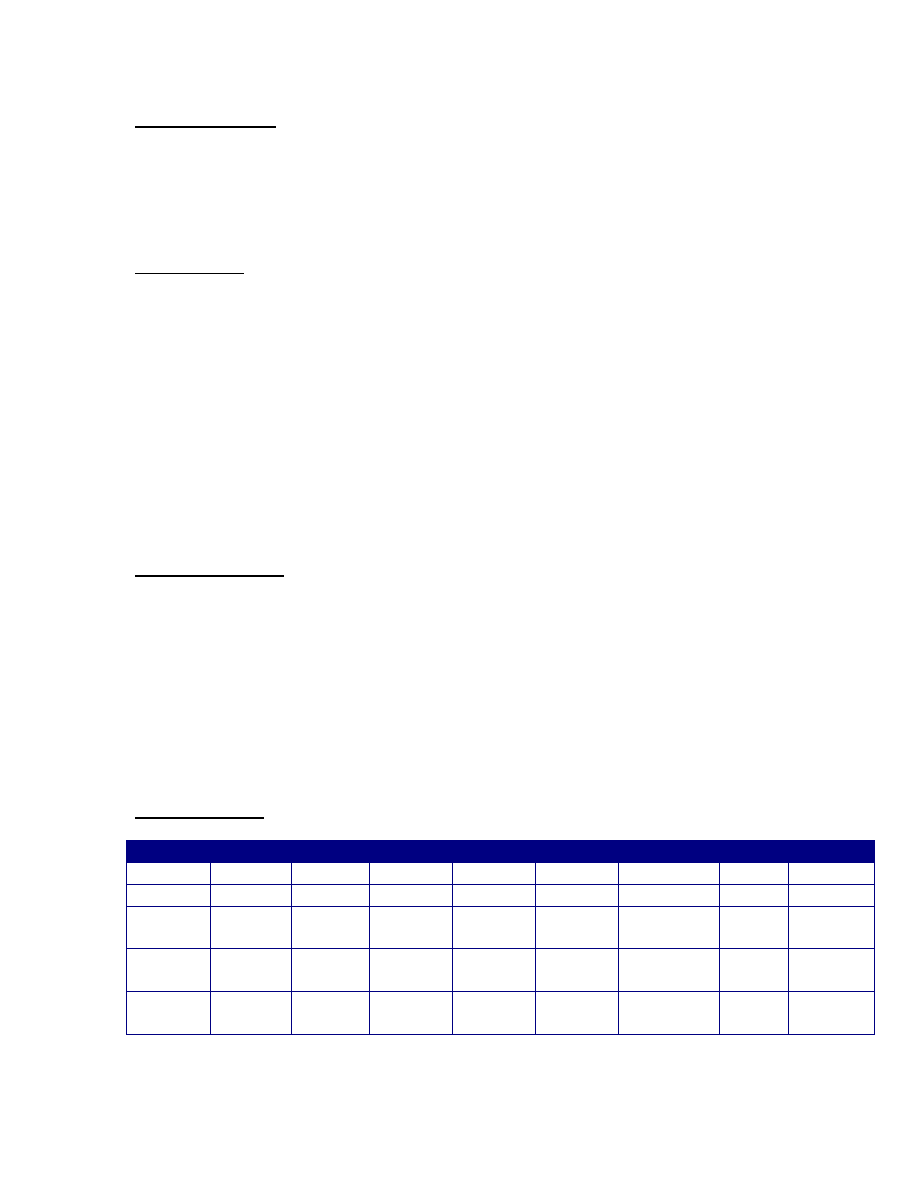
Button locations
Column Bit 7
Bit 6
Bit 5
Bit 4
Bit 3
Bit 2
Bit 1
Bit 0
0
7
6
5
4
3
2
1
0
1
Play
>>
Clear
<<
+/-
#
9
8
2
Record Params Execute Select
Block
Sample
Rate
Transpose Play
Mode
External
Trigger
3
Stop
Bend
Range
MIDI
Mode
Copy
Swap
Reverse Envelope Mix
Blocks
Stretch
Squash
4
Xmit
Receive
Block
Dump
MIDI
Channel
EPROM
Type
Verify
EPROM
Program
EPROM
Load
Data
Run
Program

Prommer Service Manual 19
ACIA (MIDI Interface)
1001 1xxx xxx1 1110
68B50 Status/Control register
1001 1xxx xxx1 1111
68B50 RDR / TDR
Please refer to Motorola 68B50 Data Sheet for more information.
Read Only Memory
101x xxxx xxxx xxxx
ROM A – 2764 (Expansion ROM)
11xx xxxx xxxx xxxx
ROM C – 27128 (Main ROM)
Programming considerations
User programs may reside in RAM or they may be placed in the expansion
EPROM space inside the Prommer.
To use the expansion EPROM with the RUN PROGRAM feature, the first three
bytes of the EPROM (addresses A000H through A002H) must be configured as
follows:
A000H = 41H (ASCII “A”). Special ID code recognized by the Prommer
operating system.
A001H = MSB of jump vector.
A002H = LSB of jump vector. This is the absolute address of the first intstruction
in the user’s program.
When the RUN PROGRAM display is entered by pressing the RUN PROGRAM
button, and any EPROM with the correct ID code is in the expansion socket, the
next key pressed will start execution of the user program. The user program
should therefore test the key that was pressed to decide whether or not to
continue. When the user program starts, the key code of the key just pressed is
located in the A register. (For a description of the key codes, please refer to the
Prommer MIDI specification in the Prommer User’s Guide.)
If your program decides to ignore the key, a JMP [0C002H] instruction should be
executed without changing the contents of the A register in order to return control
to the Prommer operating system and process the key normally. A typical user
program for the expansion EPROM might look something like this:

Prommer Service Manual 20
ORG C000H
INCODE:
FCB “A”
VECTOR:
FDB PROG_START
.
.
.
PROG_START:
; Continue only if the 3 button was pressed
CMPA #3
BEQ CONTINUE
; Otherwise return to the main operating system
JMP [0C002H]
CONTINUE:
; Main part of user program goes here
.
.
.
PROG_END:
JMP [0FFFFEH] ; Perform a software RESET to return
; control to the Prommer.
Programs written to reside in RAM should be written with relocatable code (use
only relative jumps and subroutine calls), so they may reside in any part of the
RAM. The RUN PROGRAM function, when EXECUTED while holding the
PARAMETERS button, will start execution of the user program at the first
address of the current block.
Wyszukiwarka
Podobne podstrony:
Oberheim Prommer Owners Manual
hplj 5p 6p service manual vhnlwmi5rxab6ao6bivsrdhllvztpnnomgxi2ma vhnlwmi5rxab6ao6bivsrdhllvztpnnomg
Korg SQ 10 Service Manual
MAC1500 service manual
Kyocera Universal Feeder UF 1 Service Manual
Proview RA783 LCD Service Manual
indesit witp82euy Service Manual
Glow Worm installation and service manual Hideaway 70CF UIS
Glow Worm installation and service manual Ultimate 60CF UIS
Proview SH770I LCD Service Manual
M23 Service Manual
Glow Worm installation and service manual Glow micron 60
więcej podobnych podstron